







Cloudray TR Series 5W Ultraviolet Laser Water-Cooled Autofocus Inner 3D, 2.5D & Surface Engraver compatible with Lightburn
HURRY UP! SALE ENDS IN:
Shipping calculated at checkout.
Dedicated Customer Support: US & EU Based Tech.
Laser Machine: 2-Year Warranty.
Laser engravers with FDA, CE, ROHS certifications, and QC quality inspection report.
Safe & secure

Frequently Bought Together
Cloudray TR Series 5W Ultraviolet Laser Water-Cooled Autofocus Inner 3D, 2.5D & Surface Engraver compatible with Lightburn


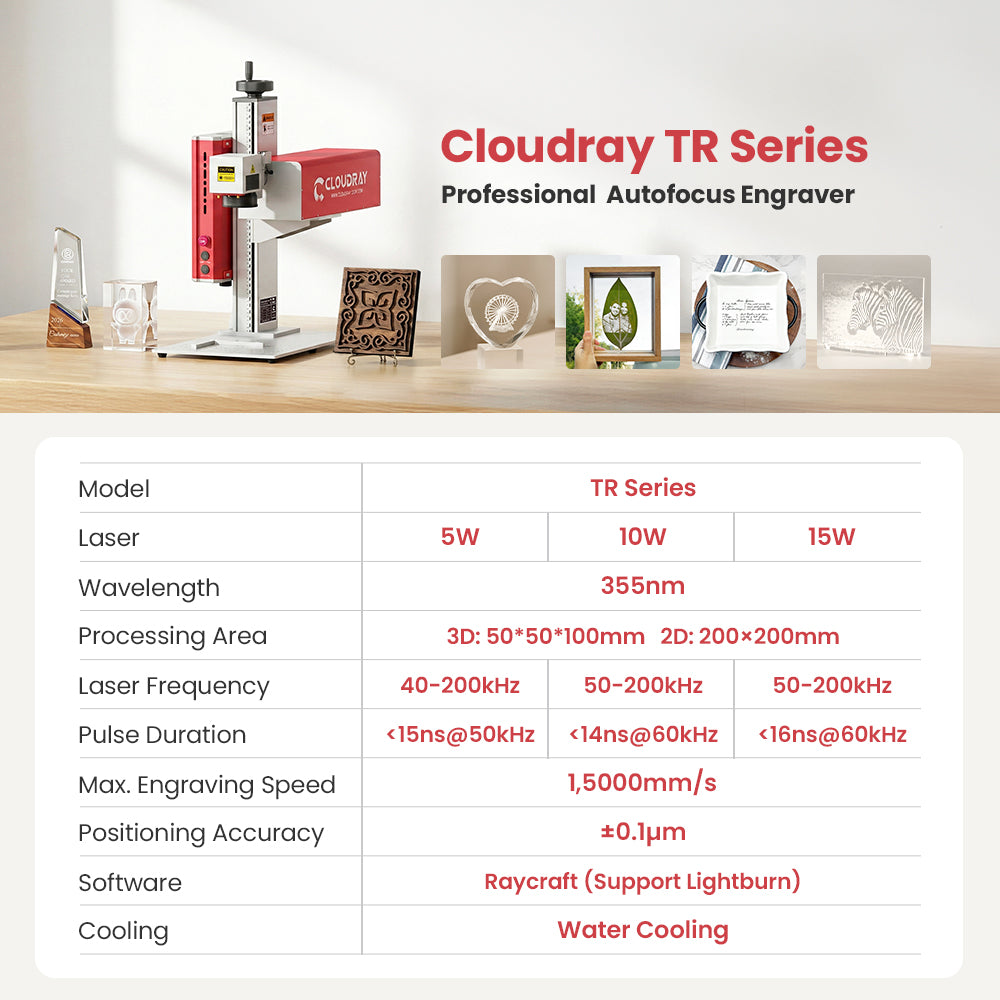
| Model | TR Series | ||
| Watt | 5W | 10W | 15W |
| Wavelength | 355 nm | ||
| Max. Marking Speed | 15,000 mm/s | ||
| Positioning Accuracy | ±0.1 μm | ||
| Processing Area | 3D: 50 × 50 × 100 mm | 2D: 200 × 200 mm | ||
| Frequency | 40–200 kHz | 50–200 kHz | 50–200 kHz |
| Pulse Duration | <15 ns @ 50 kHz | <14 ns @ 60 kHz | <16 ns @ 60 kHz |
| Beam Quality | M² < 1.3 | ||
| Beam Diameter | 0.45 ± 0.1 mm | 0.45 ± 0.1 mm | 0.5 ± 0.1 mm |
| Built-in Beam Expander | 10× | ||
| Min. Line Width | 0.01 mm | ||
| Min. Character | 0.1 mm | ||
| Software | Raycraft | ||
| Compatible Operating Systems | Windows XP, Vista, 7, 8, 10, 11 / macOS | ||
| Supported Files | .png, .bmp, .jpg, .jpeg, .dxf, .plt, .ai, .svg | ||
| Product Dimensions | 350 × 636 × 638 mm | ||
| Warranty | 2 Years for Machine (1 Year for Laser) | ||
| Power Consumption | Max. 675 W | ||
| Power Supply | AC 220 V / 50 Hz or AC 110 V / 60 Hz | ||
| Operating Temperature | -15°C to 55°C | ||
TR Series User Guide V1.3
User Manual
USB Drive Files
Driver & Files
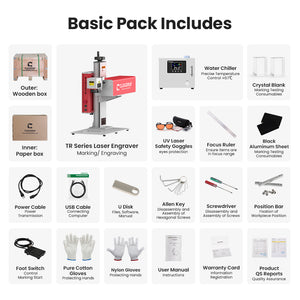
TR Series Packing List
Packing List
Raycraft Software
Software
TR Series Tutorial Videos
Video Tutorials
Inner Carving Manual
User Manual
FDA Certificate
Certification
CE Certificate
Certification
Water Chiller User Manual
User Manual
Cloudray continuously releases updates for Raycraft software. Keep your device connected to the internet to receive the latest versions and improvements.
FAQs
Which Configurations of Machine I need to choose?
QS Series: Smart Budget Option for Entry-Level Marking & Engraving. Up to 1mm engraving Depth.
MP Series: Professional-Grade Option. Enhanced Marking /Cutting Depth: Up to 5mm
GM Series: Advanced Performance for Industrial Use. 2.5D Deep Engraving +Precise Metal Cutting
UV Series: All-Material & Material-Friendly Engrvers. 3D Inner & Surface Engraving
EC Series: CO2 Precision Engraver for Non-metal Marking & Cutting
Please email us (info@cloudray.com) directly to offer us your working materials, along with the expected effect on those materials by machine, accompanied by pictures or videos.
MP Series: Professional-Grade Option. Enhanced Marking /Cutting Depth: Up to 5mm
GM Series: Advanced Performance for Industrial Use. 2.5D Deep Engraving +Precise Metal Cutting
UV Series: All-Material & Material-Friendly Engrvers. 3D Inner & Surface Engraving
EC Series: CO2 Precision Engraver for Non-metal Marking & Cutting
Please email us (info@cloudray.com) directly to offer us your working materials, along with the expected effect on those materials by machine, accompanied by pictures or videos.
What does “5-in-1” mean for the UV Pro Sereis?
It refers to the machine's ability to perform surface plane engraving, internal plane engraving, 3D internal crystal engraving, 2.5D relief, and deep engraving.
Can the engraving size for 3D internal engraving be larger?
The standard configuration is 50 × 50 × 100 mm.
It can be expanded to a maximum of 70 × 70 × 100 mm with a high-value field lens, which is sold separately.
It can be expanded to a maximum of 70 × 70 × 100 mm with a high-value field lens, which is sold separately.
What is the difference between water cooling and air cooling? What are their advantage?
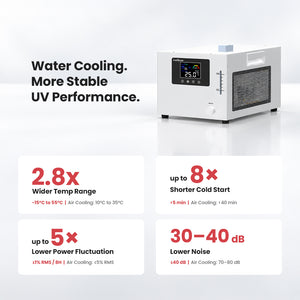
Water cooling uses an external chiller to provide efficient heat dissipation, making it suitable for long-term continuous operation and applications requiring high stability.
Air cooling features a simpler design without an external chiller, offering lower maintenance and operating costs for short-term or less demanding applications.
Air cooling features a simpler design without an external chiller, offering lower maintenance and operating costs for short-term or less demanding applications.
What should be noted when using the water chiller?
1. Use deionized water or purified water to prevent scale buildup and blockage in the cooling lines.
2. Check the water level regularly to avoid operating the system without sufficient coolant.
3. Ensure the chiller and the laser machine are properly grounded for safe operation.
4. Replace the cooling water periodically to maintain clean and stable water quality.
5. In cold environments, take anti-freezing precautions to prevent damage to hoses and the water pump.
2. Check the water level regularly to avoid operating the system without sufficient coolant.
3. Ensure the chiller and the laser machine are properly grounded for safe operation.
4. Replace the cooling water periodically to maintain clean and stable water quality.
5. In cold environments, take anti-freezing precautions to prevent damage to hoses and the water pump.
Can engraving be done inside a crystal ball?
Yes, the ball must be fully immersed in engraving oil to control laser refraction and reflection
Does it support LightBurn?
Yes, the machine is compatible with LightBurn.
What is the marking speed of laser engravers?
The maximum marking speed of Cloudray galvanometer system is 15,000 mm/s.
Cloudray recommends a common marking speed range of 2,000 to 5,000 mm/s, which enables high-quality marking for 1mm characters.
Typically, the maximum marking speed can reach the highest positioning speed of the galvanometer, depending on the engraver's specifications.
Cloudray recommends a common marking speed range of 2,000 to 5,000 mm/s, which enables high-quality marking for 1mm characters.
Typically, the maximum marking speed can reach the highest positioning speed of the galvanometer, depending on the engraver's specifications.
What's the guarantee, in case the machine breaks down?
The machine has 2 years guarantee. If it breaks down, generally speaking, our technician will figure out what the problem may be, according to clients’ feedback. Parts except for consumable parts will be replaced for free if the problems are caused by quality faults. Even if the machine is beyond the warranty, we can still offer technical assistance as your order is placed on www.cloudraylaser.com.
What should I do if the autofocus position is inaccurate?
If the autofocus position is inaccurate, you can manually recalibrate and save a new autofocus position:
1. Manually move the laser head to the correct focal position. In the software, go to Advanced → Region.
2.Click Get Height, Confirm and save the setting.
1. Manually move the laser head to the correct focal position. In the software, go to Advanced → Region.
2.Click Get Height, Confirm and save the setting.


2-Year Warranty
Offer a balanced level of protection and peace of mind for your engraver.

Worldwide Warehouses
Cloudray global logistics ensures the fastest delivery times for our customers.

Tech Support
Cloudray offers lifetime technical support, including local-based services.

Dedicated customer service
Contact Cloudray (info@cloudray.com) for
Dedicated service.

Laser Solutions
Customized laser engraving solutions for different industries.


Laser Rotary
9 items

Fume Extraction
10 items

Protective Enclosure
5 items

Laser Safety Glasses
6 items

Metal Sheet Holder
11 items

Engraving Materials
12 items

F-theta Lens
9 items

Galvo Head
13 items

Laser Controller
3 items

Fiber Laser
13 items

Machine Stands
3 items
