




Great support experience!
Cloudray Partner LightBurn Software For Laser Cutter Control / Galvo Laser Control

Notification: This is a Combination of Products, only Customer Who Ordered Cloudray laser Machines in needed of Pro Versio or Related Diode Laser that needs a G-code Version can normally order.

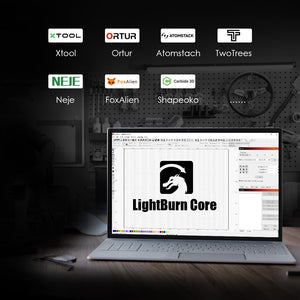
LightBurn Core software license key for users with GCode controllers (DIY / hobby).
LightBurn Core supports Cohesion3D, Smoothieware, Grbl, Marlin, and Grbl-LPC based controllers.
Often used in open-frame diode lasers made by:
Ortur,xTool, AtomStack, TwoTrees, Neje, FoxAlien, EleksMaker, Shapeoko,3018 CNC machines...and many others.
if you have an existing LightBurn Core license, you can upgrade from Core to Pro by paying the difference in price

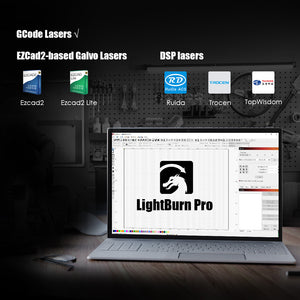
LightBurn Pro is the “everything” license of LightBurn and covers all supported controllers including GCode lasers (Cohesion3D, Smoothieware, Grbl, Marlin, and Grbl-LPC based controllers) DSP lasers (Ruida, Trocen, TopWisdom) and EZCad2-based Galvo lasers (fiber, CO2, or UV) connected with a USB cable.
Download & Trial - Try before you buy
If you're new here, we want to be sure that LightBurn will work for you. To give you a chance to really use it, we offer a 30-day trial period, with no restrictions. Make some things on us. Have fun - this is the full deal, with no watermarks, and no limits.
If you're already a licensed user, and your license has not expired, you can download the latest release below.
Please Download or trial Lightburn Software Here.
FAQ
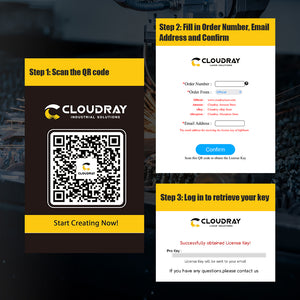
1. How to Scan the QR code to get the license Code?

2. How long does my license last?
LightBurn will work forever as long as you have your license key, but after a year you will need to renew the maintenance on your license to keep getting the latest features and updates.
3. What does it mean to extend my license?
The license key has an expiry date for updates: one year from when you first activate it. When it expires, it's still valid, you just don't get updates anymore. If you download a version of LightBurn released after that date, it won't work, but any version released before the key expires will continue to work.
4. Can I add another type of laser?
Yes. You can add an unlimited number of lasers to LightBurn. LightBurn supports three classes of laser: GCode, DSP, and Galvo. If you want to add a machine of a different class than the one you have now, you may need to upgrade your license.
Visit: https://lbrn.info/add-dsp to add DSP machines to an existing license, and https://lbrn.info/add-galvo to add Galvo machines to an existing license.
5. How do I remove my license from an old computer?
If you still have access to the old computer, you can deactivate it following these instructions: https://lbrn.info/move-license.
Or you can use the License Portal to manage your activations, as explained here: https://lbrn.info/manage-license
Overall rating: 4.9 / 5 from 54 reviews.
Great support experience!
Cloudray Partner LightBurn Software For Laser Cutter Control / Galvo Laser Control
good
Cloudray Partner LightBurn Software For Laser Cutter Control / Galvo Laser Control
Used on Mac , works like a charm. Support was fantastic helping me configure it. Just missing inside crystal engraving or autofocus (actually, does not know how to use the z axis of the laser)
Cloudray Partner LightBurn Software For Laser Cutter Control / Galvo Laser Control
Works Great
Cloudray Partner LightBurn Software For Laser Cutter Control / Galvo Laser Control
Cloudray had great communication from start to finish. There was a shipping issue that was not their fault but they immediately responded to my emails. The galvo was easy to set up and I was running jobs within an hour of unboxing.
Cloudray Partner LightBurn Software For Laser Cutter Control / Galvo Laser Control

Best software for lasers
Cloudray Partner LightBurn Software For Laser Cutter Control / Galvo Laser Control
Ok, Full
Cloudray Partner LightBurn Software For Laser Cutter Control / Galvo Laser Control

Work like you want it to. Easy and great
Cloudray Partner LightBurn Software For Laser Cutter Control / Galvo Laser Control
This was a repeat order of some great parts. Arrived fron China to UK in 4 days. Super happy with the trusted service from Cloudray
Cloudray Partner LightBurn Software For Laser Cutter Control / Galvo Laser Control

LightBurn is easy to use with a lot of features, but you can start cutting/engraving within a few minutes.
Cloudray Partner LightBurn Software For Laser Cutter Control / Galvo Laser Control
Light Burn ist eben die beste mir bekannte Lasersoftware für Ruida & GRBL Controller. Auch die Abklärung mit Cloudray verlief sehr gut und freundlich. Danke & LG René
Cloudray Partner LightBurn Software For Laser Cutter Control / Galvo Laser Control
Almost everything is fine except that I have to manually calibrate new lenses.
Cloudray Partner LightBurn Software For Laser Cutter Control / Galvo Laser Control
Purchased the Cloudray 100 watt laser and the service was great all the way. They kept in contact with me till it arrived. Great communication. Machine looks great and light burn is better than i thought it would be. looking forward to getting things made. Would be nice to have material library to help out. should come with a few to help get you started. hopeful in the future they do this.
Cloudray Partner LightBurn Software For Laser Cutter Control / Galvo Laser Control

It's amazing how easy it is to take an idea and create it. Love it!
Cloudray Partner LightBurn Software For Laser Cutter Control / Galvo Laser Control
I bought this software and was worried at first about how to use it. I was totally overthinking it. The after-sales service staff were very responsible and told me how to use it in a very complete and detailed manner. Now I have become very proficient in using this software and I am very happy!
Cloudray Partner LightBurn Software For Laser Cutter Control / Galvo Laser Control

This is my first fiber laser. The CLOUDRAY QS50 watt. I’ve been pretty pleased with all the out comes I have gotten with it. I’ve had it about 2 weeks. I would recommend this laser to anyone that is thinking about a first fiber laser
Cloudray Partner LightBurn Software For Laser Cutter Control / Galvo Laser Control
Good experiencie with Cloudray team, professional treatment, thanks a lot!
Cloudray Partner LightBurn Software For Laser Cutter Control / Galvo Laser Control
Wszystko w jak najlepszym porządku. Polecam.
Cloudray Partner LightBurn Software For Laser Cutter Control / Galvo Laser Control
Transaction went fine, license activated, good in general.
Cloudray Partner LightBurn Software For Laser Cutter Control / Galvo Laser Control

OK
Cloudray Partner LightBurn Software For Laser Cutter Control / Galvo Laser Control
Everything worked great. First time I ever used a fiber laser. We were up and running after one day from unpacking to making first engravings.
Cloudray Partner LightBurn Software For Laser Cutter Control / Galvo Laser Control

Bought lightburn and easily produced quality art
Cloudray Partner LightBurn Software For Laser Cutter Control / Galvo Laser Control
Het werkt erg makkelijk
Cloudray Partner LightBurn Software For Laser Cutter Control / Galvo Laser Control
Really good program
Cloudray Partner LightBurn Software For Laser Cutter Control / Galvo Laser Control
Bestellt, bezahlt, geliefert. Alles OK Jederzeit wieder
Cloudray Partner LightBurn Software For Laser Cutter Control / Galvo Laser Control
Very good Customer Service
Cloudray Partner LightBurn Software For Laser Cutter Control / Galvo Laser Control
Easy to use and delivered quickly
Cloudray Partner LightBurn Software For Laser Cutter Control / Galvo Laser Control
Amazing
Cloudray Partner LightBurn Software For Laser Cutter Control / Galvo Laser Control
Outstanding delivery and product. Very happy with the laser
Cloudray Partner LightBurn Software For Laser Cutter Control / Galvo Laser Control
Super software!
Cloudray Partner LightBurn Software For Laser Cutter Control / Galvo Laser Control
Seems to be easy to get started. Just did simple engraving so far. Achieved excellent results. Need to learn more before I try the rotary engraving. Seems like a good choice in software !
Cloudray Partner LightBurn Software For Laser Cutter Control / Galvo Laser Control
Great Product
Cloudray Partner LightBurn Software For Laser Cutter Control / Galvo Laser Control

the machine is great
Cloudray Partner LightBurn Software For Laser Cutter Control / Galvo Laser Control
Love it. Fast shipping great customer service
Cloudray Partner LightBurn Software For Laser Cutter Control / Galvo Laser Control
Works great
Cloudray Partner LightBurn Software For Laser Cutter Control / Galvo Laser Control
great customer support
Cloudray Partner LightBurn Software For Laser Cutter Control / Galvo Laser Control

Lightburn with Galvo support allowed me to connect to my Mac (EZ Cad is PC only) and integrated beautifully with my design workflow. The material test and lens correction tools make it easy to build device profiles, so changing lenses is fast and easy. While the COR files provided by the manufacturer are good, every device is slightly different, so being able to precisely dial in your alignment and lens distortion correction takes you from good to excellent. I used Lightburn on a gantry laser, and moving to Galvo, everything just makes sense. If you're new to this software, Lightburn has excellent online videos to get you started.
Cloudray Partner LightBurn Software For Laser Cutter Control / Galvo Laser Control
Lightburn is great software to pair with a great Galvo fiber laser.
Cloudray Partner LightBurn Software For Laser Cutter Control / Galvo Laser Control

This software is out of this world, with how good it is. And always making lots of updates with new features. Once you use LightBurn, you will never look back. Perfection.
Cloudray Partner LightBurn Software For Laser Cutter Control / Galvo Laser Control

Très bon
Cloudray Partner LightBurn Software For Laser Cutter Control / Galvo Laser Control
